Solo
Up to 4 crews
$99 a monthbilled monthly $990 a yearbilled yearly, two months free
Cleaning business software with smarter routes for every crew, instant estimates clients can book on their own, automatic card payments after the clean, and a client experience that keeps regulars coming back and sends you their friends.
30-day free trial. No card needed to start.
More revenue: less driving between houses leaves room in each crew's day for more cleans.
Less admin: plan tomorrow's routes in a few clicks instead of an evening of shuffling.
More revenue: clients get a price and book the moment they're ready, even at 10 at night.
Less admin: no more quoting by text or phone, back and forth.
More revenue: recurring cleans, Google review invites and referral codes keep regulars and bring in new clients.
Less admin: clients skip, pause or move their own visits without calling you.
More revenue: the card on file is charged after every clean, and you choose whether to charge no-show and late-cancel fees.
Less admin: no chasing payments, and hours for payday are recorded for you.
Less drive time means more cleans per crew, and you get your evenings back.
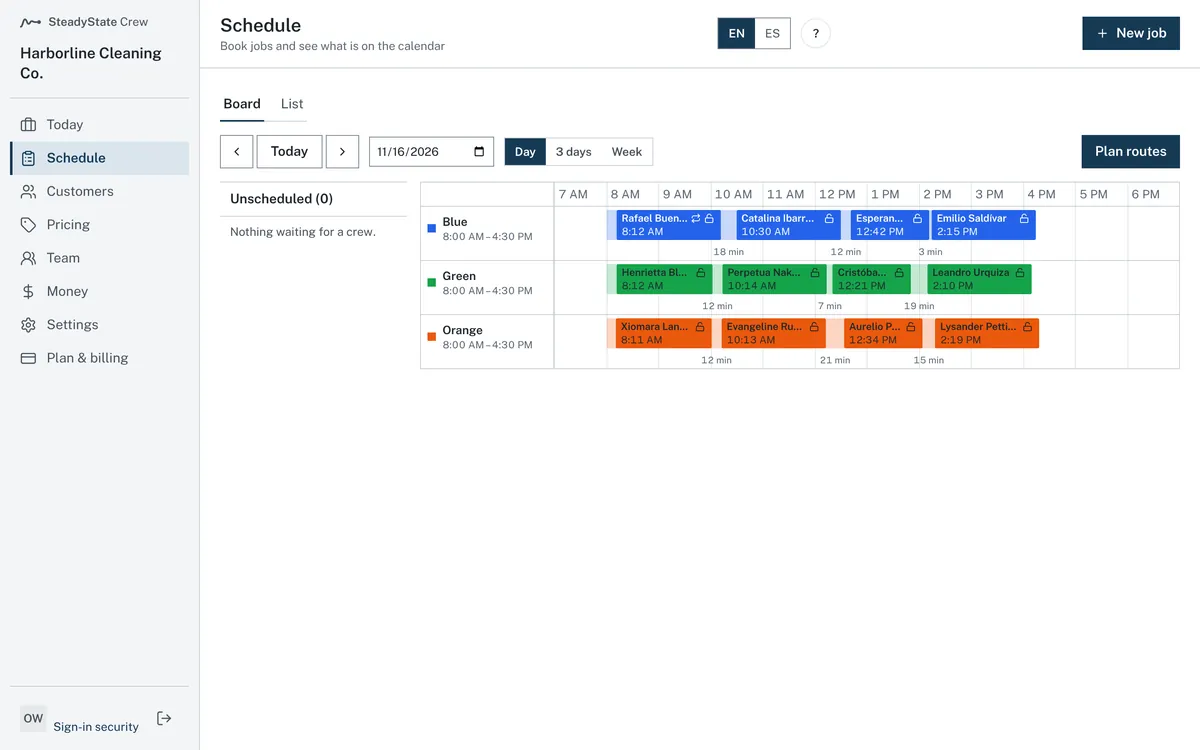
New bookings wait in a list of jobs not yet on the schedule. Drag each one onto a crew's day at the hour you want. If the spot clashes with something, the board warns you before you place it.
Day, 3-day and week views. Move a job to another crew with one drag.
Select Plan routes and get a suggested driving order for each crew. You see the current day next to the suggestion, with drive time and distance for both, and nothing moves until you accept it.
Lock the jobs that must stay put, then plan again around them.
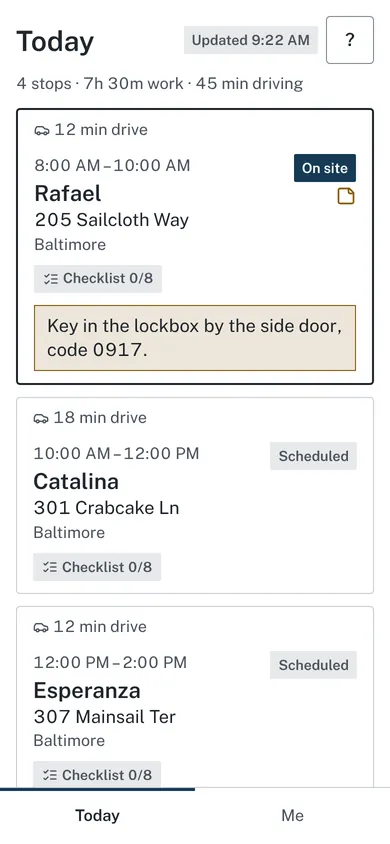
The Today board lists each crew's stops in order, with a status on every stop: Scheduled, On the way, On site, Done or Problem. It updates as your cleaners move through their day.
Failed card charges and problems from the crews show at the top.
No more texting addresses and gate codes the night before.
Cleaners see today's stops in order. Each stop has one-touch directions, a button to call the client, and the entry notes to read before they knock. They mark when they're on the way, when they arrive and when they're done, check off the checklist and add before and after photos.
Nothing to download from the App Store or Google Play. Cleaners open their day from a link in an email, and can add it to their home screen so it opens like an app. Works on iPhone and Android.
No signal in a basement? Their updates are saved on the phone and sent when the signal comes back.
Every quote you text back at night is a client who might book someone else first. Let them see the price and book on the spot.
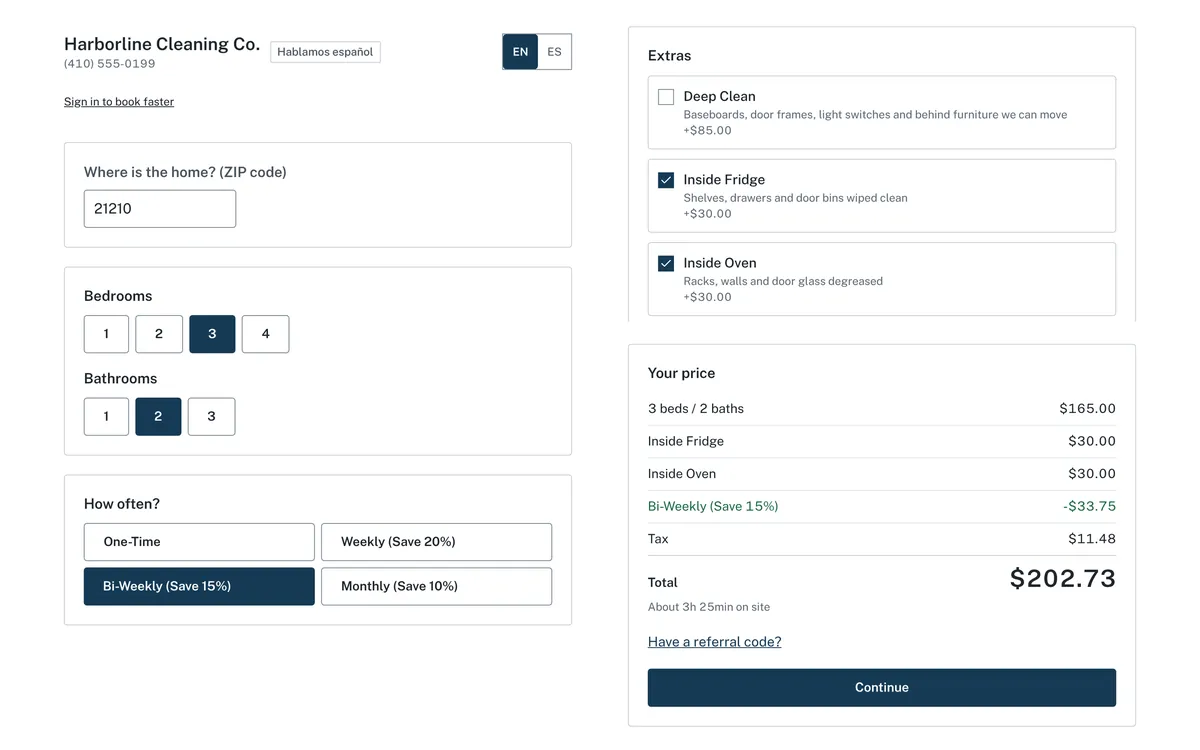
Clients pick bedrooms and baths, add extras and see the price right away on your booking page. Then they choose a time and save a card, and the job lands in your list to schedule.
You set the prices, the discounts for weekly, every other week and monthly cleans, and extra charges by zip code.
One clean is nice. A client who books every other week for years, and sends you their neighbors, is where the revenue is.
Clients who would drift away after one clean stay on a schedule. From their own page they can skip a visit, pause, change how often, or move a visit, without calling you.
They get a booking confirmation, a reminder before each visit, an On my way email with an expected arrival time, a receipt, and a page to tip the crew. All by email.
After the clean, clients rate it. Those who give 4 or 5 stars are invited to post a Google review. A rating of 1 to 3 stars shows no Google link, and the comment comes to you so you can call.
Turn on referral codes: a friend gets a discount when they book with your client's code, and your client earns a credit once the friend's first clean is paid. You see which bookings came from referrals.
Look as put-together as the big companies, with a website and booking page in your name. Clients can book and get their emails in English or Spanish.
Get paid for every clean without chasing anyone.
Upload a spreadsheet (CSV file) of your clients and bookings, or an export from the software you use now. Check the preview before anything is saved, and undo the import within 7 days if something looks wrong.
Tell us your business name, city and how many crews you run. We email you a link to create your business, and your 30-day trial starts.
A checklist on your Today screen walks you through your prices, service area, first crew and Stripe. Add a card and publish your booking page. Nothing is charged until your trial ends.
Share your booking link with clients. New bookings land on your schedule, and your crews see their day on their phones.
One price for the whole business, not per person. No per-job fees, and every feature is in both plans. Your price stays locked as long as you stay subscribed. Your plan follows how many crews you run, and we email you at least 7 days before your plan changes.
Up to 4 crews
$99 a monthbilled monthly $990 a yearbilled yearly, two months free
5 or more crews
$149 a monthbilled monthly $1,490 a yearbilled yearly, two months free
Every plan starts with a 30-day free trial. Cancel anytime.
Questions about plans and billing? See the help center.
30-day free trial. No card needed to start.
Start your 30-day free trial today. No card needed to start.
30-day free trial, no card to start.